How to change your meal plan mid-week without starting over
Most meal plans break the first busy Wednesday, and most apps make you start over or regenerate. The fix is to re-plan the rest of the week: move the Batch, slide its Leftovers onto the nights you can't cook, and update the grocery list. In Cauli you say what happened in plain words, it proposes the change with its effect on your numbers and groceries, and nothing moves until you confirm.
Three common breaks, and the fix
| What happened | Fix by hand | In Cauli |
|---|---|---|
| "Thursday's a late night now" | Turn Thursday dinner into a Leftover from an earlier Batch; if there isn't one, make the next free night's dinner a Batch | Say it. Cauli proposes moving a Leftover onto Thursday and shows the knock-on to other days and the list |
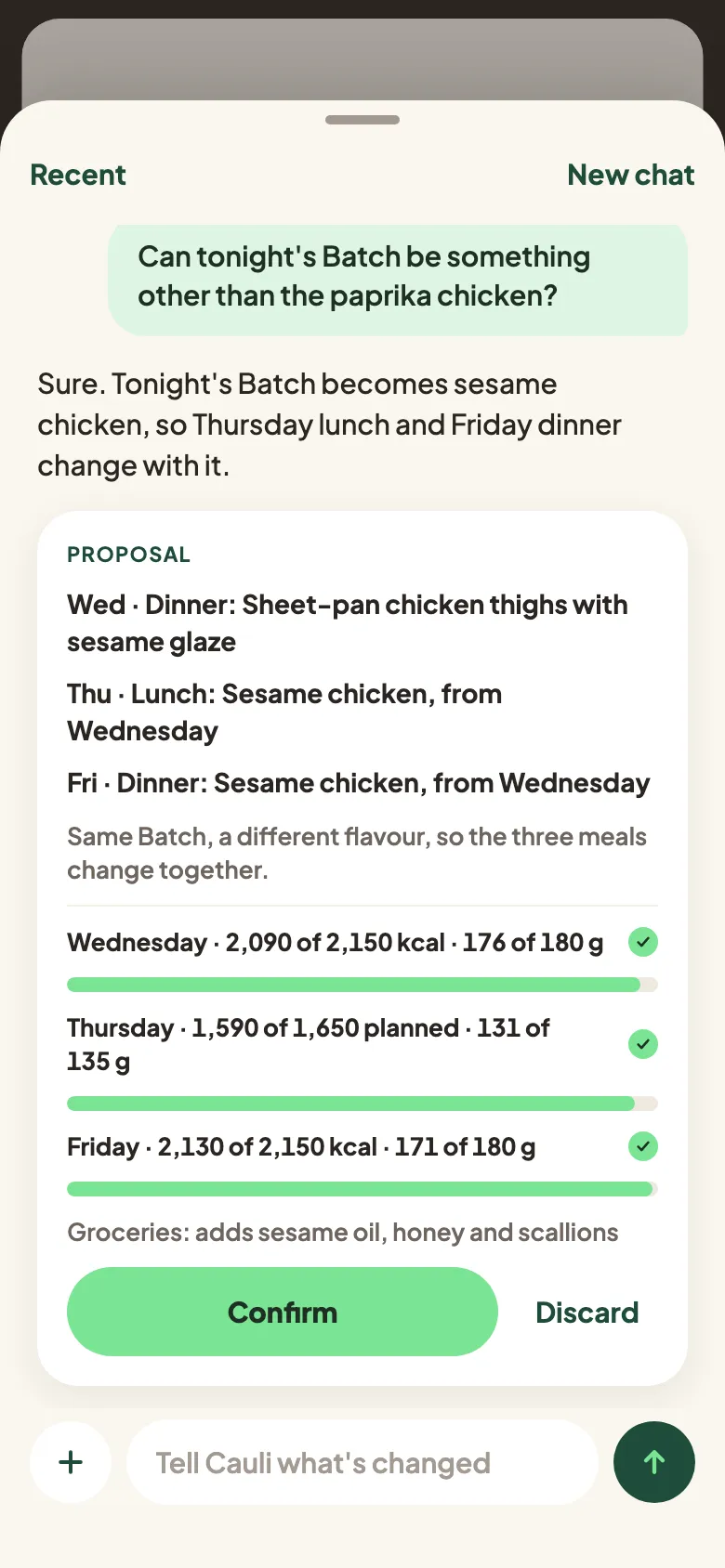
| "I don't feel like tonight's Batch" | Swap it, and remember its Leftovers change too | Ask for something else; the proposal changes the Batch and every meal it feeds, plus the groceries |
| "Can I bake the salmon instead?" | Just do it | A change inside one meal applies at once, with Undo |
| "I'm out of rice" | Cross it off, buy it or substitute | Cauli updates Your kitchen straight away; any meal change that follows comes as a proposal |
Why "regenerate" isn't the answer
Regenerating a day throws away the parts that were working. It can strand a Batch you already cooked, double up an ingredient you already bought, and leave the grocery list out of date. A real re-plan changes only what has to change and tells you what that touches.
How Cauli handles a change
- You say it, any way you like. The chat is one tap away and knows the screen and meal you're on.
- Cauli proposes. A card shows what changes across the week, how your day's numbers land and what the grocery list gains or loses.
- You confirm or discard. Nothing moves until you do.
The named exceptions, all of them:
- A small change inside one meal (method, equipment, timing, seasoning, a minor swap) applies at once with Undo.
- An allergy you add replaces affected meals straight away, because safety can't wait for a tap.
- Telling Cauli what you have ("out of rice") or what you like updates Your kitchen or what Cauli knows. Any meal change that causes is still a proposal.
Cauli is on the App Store for iPhone. It isn't medical advice and doesn't order groceries.
Questions people ask
What do I do when my meal plan falls apart midweek?
Fix the rest of the week, not just tonight. Move a Batch to the next free evening, slide its Leftovers onto the nights you can't cook, and update the grocery list. Cauli does this when you tell it what happened, and shows the change before anything moves.
Does Cauli change my plan without asking?
No. Every change to the plan from the chat comes back as a proposal to confirm or discard. The exceptions are small: a tweak inside one meal (method, timing, seasoning) applies at once with Undo, and an allergy you add replaces affected meals straight away.
Can I just swap one meal?
Yes. Swap is on every meal and offers one alternative at a time, with its numbers.
What if I ate out unexpectedly?
Skip Ate it for that meal and carry on. Cauli doesn't make you pay it back: the rest of the week stays on target as planned. If you'll miss planned meals, tell Cauli and it proposes leaving them unplanned. Planning eating out ahead of time isn't in the first version.